
Status: working prototype — I use it myself every day, and I’m now working to turn it into something other people can use. No one else can sign up yet. Screenshots show sample data.
The first thing I built with Claude Code was an assistant I’d always wanted: something that could see the moving parts of my day and help me run it, instead of handing me one more app to check.
It grew up. It’s a product now, called Pulse.
Most software shows you data and leaves you to draw the conclusion. Inbox, calendar, watch — separate islands. Connecting them — noticing you slept badly the night before a meeting that matters — is left to you.
Pulse draws the conclusion. It connects the streams of a life — email, calendar, health, tasks, people — and tells you what to do today and why. Not a dashboard. A short morning read: what matters, what needs you, what to resolve before it becomes a problem.
Nothing on the market drew the whole picture. Productivity tools ignored health; health apps ignored the rest. I wanted the 360, with health included.
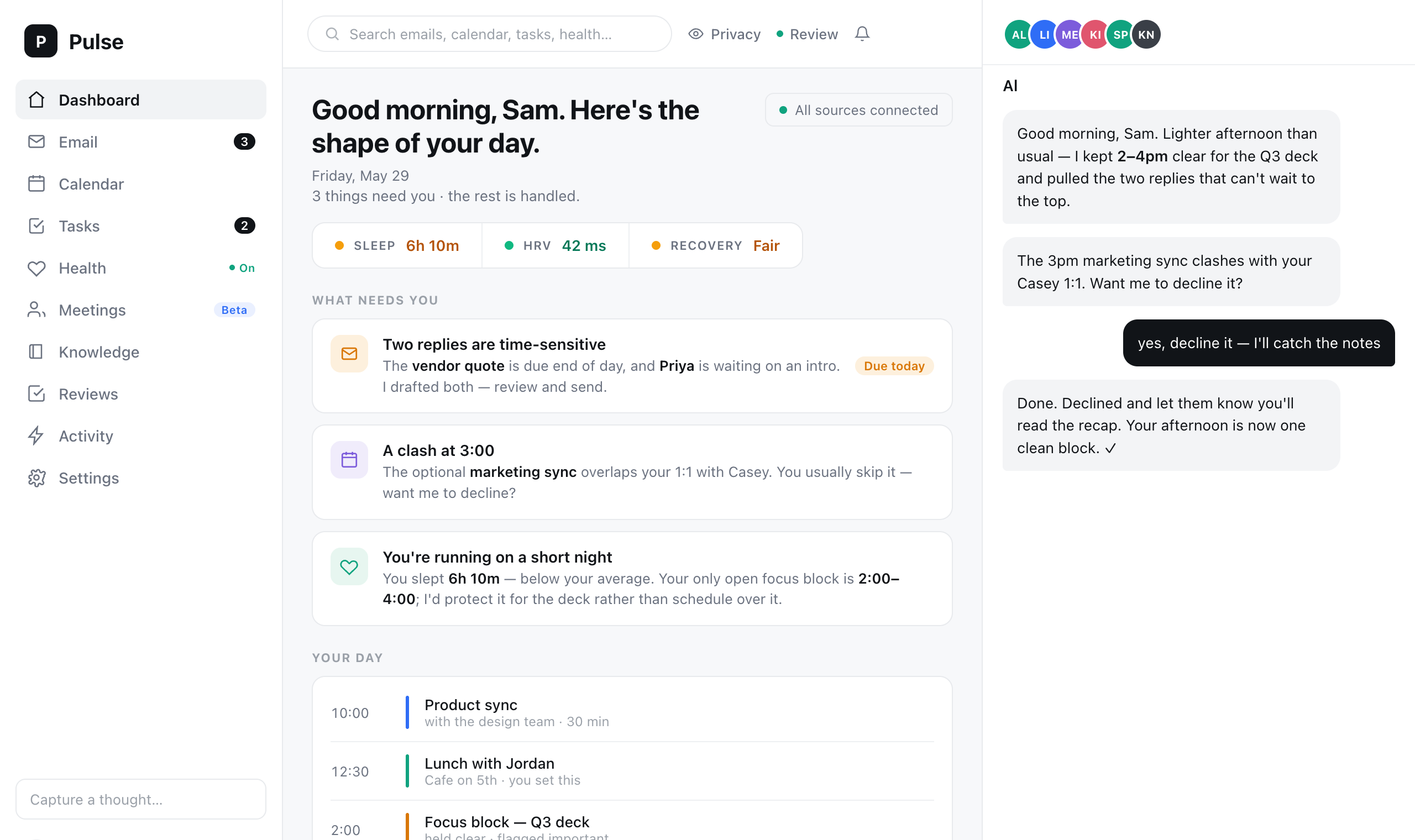
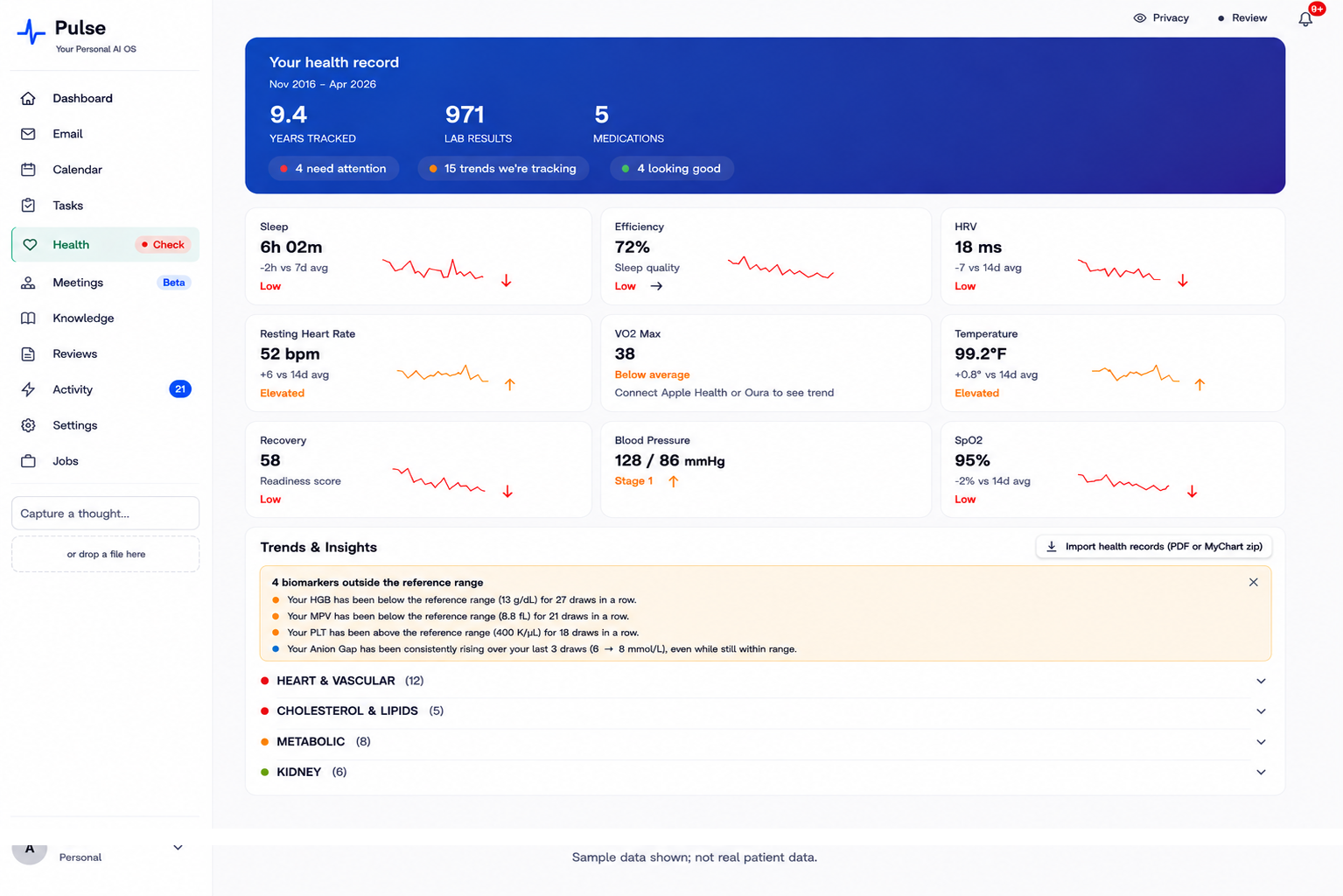
Building it for myself was one thing. Turning it into something another person could use forced a question I couldn’t dodge.
Where does the data live
To be useful, Pulse has to see the most personal things you have. Mail. Calendar. Health. Sending all of that to a cloud server — even just so an AI can read it — asks people to hand their private life to a company and trust it. I didn’t want to build that product.
So I made the call that shapes everything else: your personal data stays on your own machine. Email, health numbers, calendar, the notes the assistant keeps — all of it lives in a small database on your computer, not on mine. The cloud holds a login, a bill, and a short trail of which AI calls were made so I can see if anything is misbehaving.
That decision cost me. It’s harder to build and harder to sync to a phone than putting everything on a server. I kept it anyway. An assistant that knows everything about you should keep what it knows where you can see it and pull the plug on it.
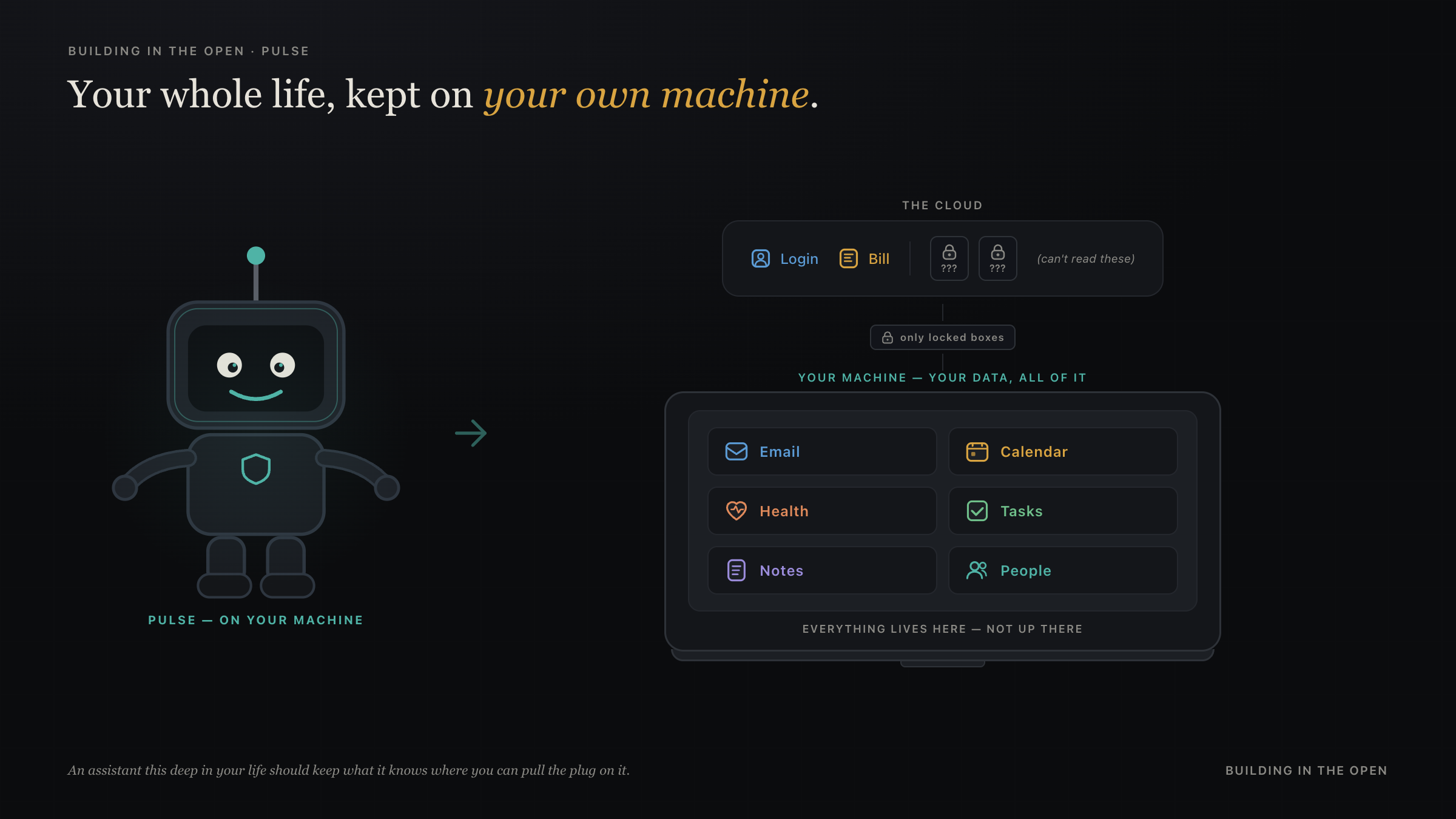
I built Pulse locally first, then moved it onto cloud hosting for a stretch — I thought that was the only way to use it from a phone. The personal data went up with it. Then I asked whether I could keep everything local and still reach it from a phone. The answer was yes, and I moved it back.
There is one place the data does leave. When the assistant reasons — to write your morning read, or answer a question — the slice it needs goes to the AI model, Anthropic’s by default. It travels over an encrypted connection, under that provider’s terms, and is not stripped of personal detail — the detail is what makes the answer worth having. Your life stays on your machine; only the slice being reasoned about right now is shown to the model. Shrinking that slice, and letting you bring your own AI account, is still unfinished work.
Where it stands today: health data is encrypted at rest (AES-256-GCM, key derived from your passphrase). The rest of the on-disk database is not yet — that’s next. Local-first, mobile access without cloud personal data, and the daily audit-log cleanup are wired.
This blog is written by agents from my own work logs and approved by an AI editor — including the rule that nothing personal about my health makes it onto the page. Pulse is the same instinct in product form: private things stay private by design.
Agents decide, the system checks
The other hard part is trust of a different kind. Pulse doesn’t just read your life; it acts on it — declines a meeting, drafts a reply, schedules something. Once software starts doing things for you, “it probably worked” isn’t good enough.
So Pulse splits the job. The agent decides what to do. A separate part enforces the rules and checks the result. Actions that change the real world — a calendar write, a sent message — run through a checkpoint, and a second pass confirms what happened matches what was intended. If it doesn’t, you hear “Pulse tried to do this and got that instead,” not silence. Anything touching your real calendar waits for your yes.
Same shape as the team of agents I wrote about building for myself: one part does the work, another refuses to take the work’s word for it.
Pulse is a work in progress. I’m dogfooding it. The goal is to open it to other people.
Learnings
The assistant was the first thing I wanted and the last thing I expected to turn into a product other people might use. What made it a product was not a feature. It was a stance: the personal data stays on your machine, and the software has to show what it did, not just say it did something.
Both of those are more challenging architecturally than the easy version. Keeping data local while still working on a phone, and supporting non-API LLM workflows (using a Claude Pro or Max subscription, not just a billing-per-token API), took more design than renting a database in the cloud would have. Verifying every action is slower than trusting it. But they are the two things that decide whether anyone should let an assistant this deep into their life — and getting them right is the product, not the polish on top of it.
I set out to build an assistant for myself. What I learned building it for other people is how hard it is to build something that can actually be trusted at that depth. Trust is not a feature you add at the end. It shapes every decision before it.